Claude Config
The Claude Config section is a visual editor for ~/.claude/settings.json — the file Claude Code reads to know your preferences (default model, theme, language, output style, …). Instead of hand-editing JSON, you toggle, choose and tune values in a real form, and CLACOROO writes the file atomically.
This is the only file CLACOROO writes directly. Every other mutation goes through claude ... commands. It also includes a dedicated permissions editor for the allow / ask / deny rules (see below).
Overview
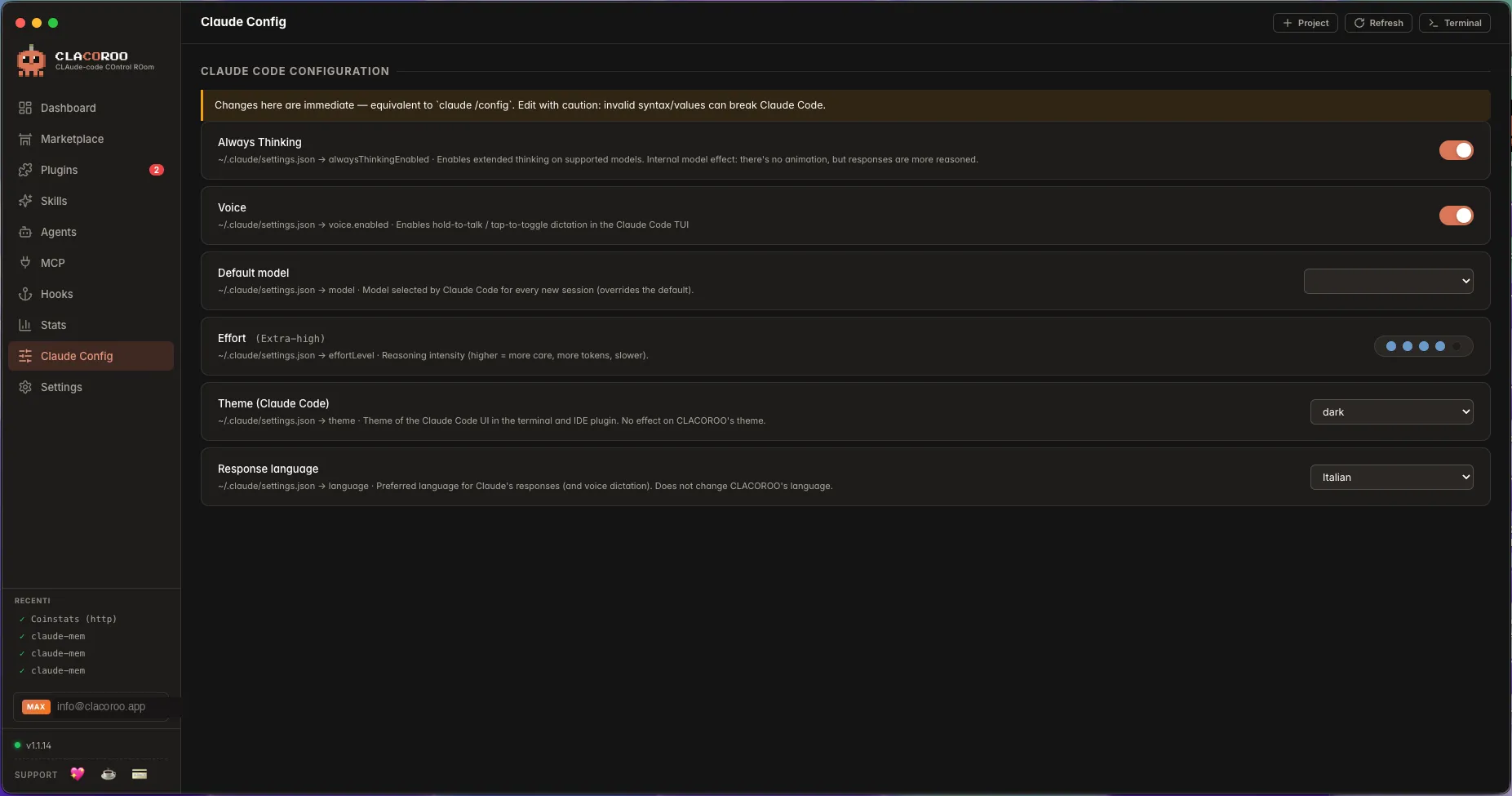
A list of rows, each tied to a key in settings.json:
- A short label in human English
- A description (“
~/.claude/settings.json → <key>”) - The current value, plus the control to change it (text input, dropdown, dots-slider, toggle, depending on the key’s type)
The section reads settings.json from disk on entry and writes it back on every change. The Dashboard’s Always-on tokens and several KPIs can change as a side effect of edits here.
What it shows
Common settings
The exact list depends on your Claude Code version, but typically you’ll find:
| Setting | What it does |
|---|---|
| Model | The default model Claude Code uses: a family alias (Opus, Fable, Sonnet, Haiku), which always follows the newest model, or a fixed version (e.g. Opus 5.5, Sonnet 5.5) |
| Theme | Dark / light / auto |
| Language | UI language for Claude Code itself (separate from CLACOROO’s UI language) |
| Output style | How Claude Code formats its replies |
| API key path / helper | Where to fetch the API key from (if set) |
| Effort | Reasoning effort for models that support it (a dots-slider from minimum to maximum) |
| Verbosity / tool budget / autoUpdate | Various toggles and numeric tweaks |
Each row’s description tells you the literal JSON key being edited — useful when you want to refer to it in a script or a config snippet.
Controls
- Text input — for free-form strings or paths
- Dropdown — for enumerated values (theme, language, model family)
- Dots-slider — for ordinal values (effort, tool budget) — five steps, dot-style like VS Code
- Toggle — for boolean flags
How edits are written
When you change a value, CLACOROO:
- Reads the current
settings.jsonfrom disk - Applies the change to the JSON object
- Writes the file back atomically (temporary file + rename) so the file is never half-written
- Updates the row to show the new value
- Triggers a refresh of dependent sections (Dashboard KPIs, etc.)
If two CLACOROO windows are open, only one should be editing settings.json at a time — the file watcher will pick up changes either way.
Permissions editor
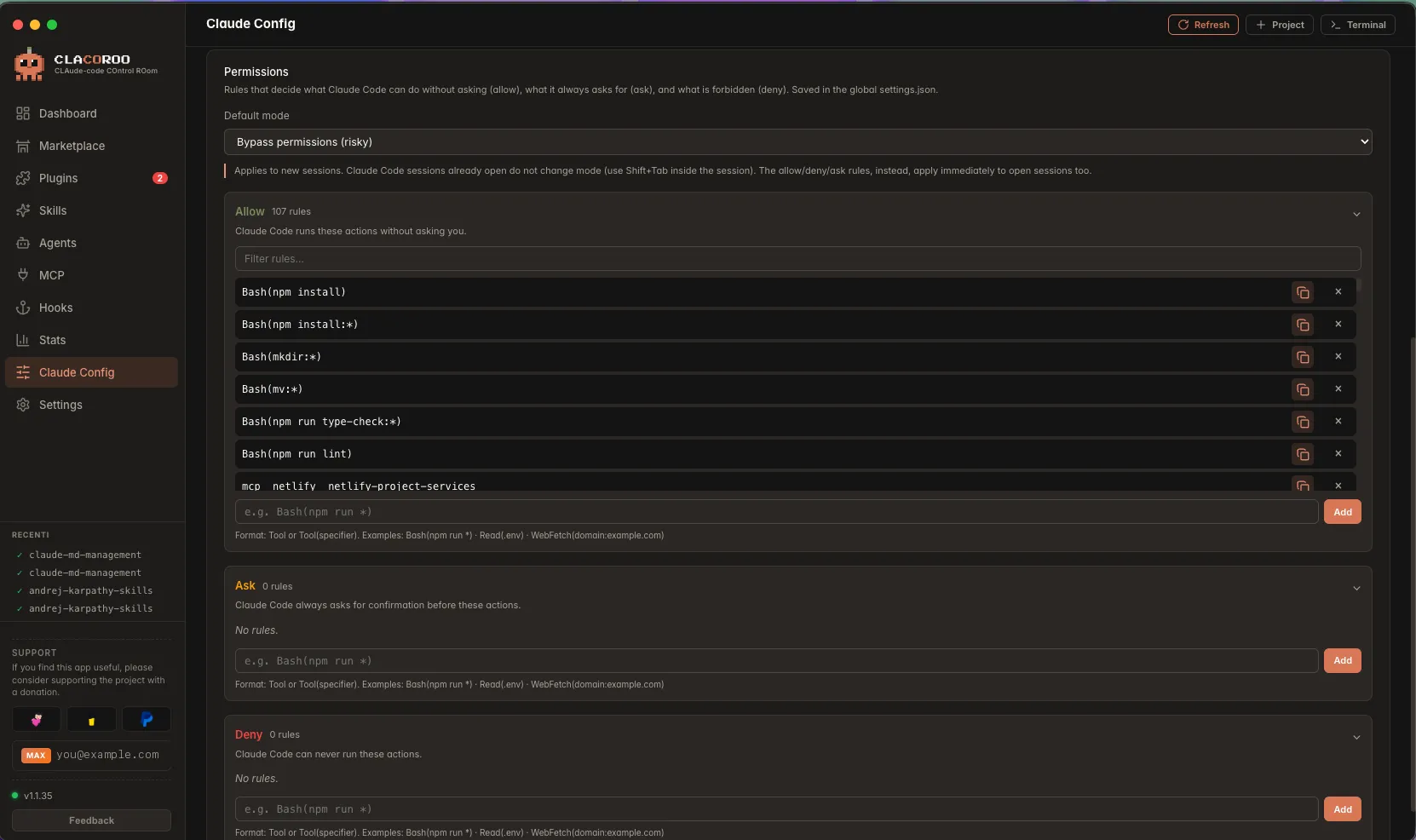
CLACOROO ships a dedicated editor for Claude Code’s permission rules — the permissions block of settings.json that decides what Claude Code may do on its own. Instead of hand-writing rule arrays, you manage three lists plus a default mode:
- Allow — actions Claude Code may run without asking
- Ask — actions it must ask about every time
- Deny — actions that are forbidden outright
- Default mode — the starting permission mode for new sessions (
default,acceptEdits,plan,bypassPermissions)
Precedence is deny → ask → allow: the first list that matches an action wins, so a deny always beats an allow for the same rule. CLACOROO surfaces this — if you add a rule that already lives in another list, it warns you (the same action can legitimately sit in two lists; precedence decides which applies).
Each list is collapsible, with a search box once it grows past a handful of rules. Every rule has a copy button (handy to move a rule from Allow to Deny without retyping) and a remove button. The add field validates the format as you type and warns when a rule is unusually broad (e.g. a bare Bash) or destructive.
Rules use Claude Code’s own syntax — a tool name (Read, Edit, WebFetch), a tool with a matcher (Bash(npm run test:*)), or an MCP tool (mcp__server__tool).
When changes take effect. The Allow / Ask / Deny lists apply immediately, even to Claude Code sessions already open. The default mode only applies to new sessions.
Common tasks
How to change the default model
- Find the Model row
- Click the dropdown
- Pick a model (e.g.
claude-sonnet-5-5) - CLACOROO writes the change to
settings.jsonimmediately; Claude Code picks it up on the next session
How to switch the Claude Code UI language
- Find the Language row
- Pick the language from the dropdown
- Restart Claude Code if needed (CLACOROO’s own language is unchanged — it’s controlled from Settings · Language)
How to tune the reasoning effort
- Find the Effort row (if your model supports it)
- Click the dots from low to high to dial it up or down
- The slider’s label updates (“minimum”, “low”, “medium”, “high”, “maximum”) as you move
How to add or move a permission rule
- Open the Permissions editor in Claude Config
- In the target list (Allow / Ask / Deny), type the rule in the add field — e.g.
Bash(git push:*) - Watch the inline feedback: a format error blocks the add, while a “broad”, “destructive” or “duplicate” warning is just advice
- To move a rule between lists, use its copy button, paste it into the other list’s add field, then remove the original
How to edit the raw JSON (when you must)
There’s no built-in raw JSON editor in this section — by design. If you need to edit something not surfaced by the form:
- Find the file in
~/.claude/settings.json(macOS/Linux) or%APPDATA%\Claude\settings.json(Windows) - Open it in your editor of choice
- Save — CLACOROO picks up the change at the next refresh
The CLAUDE.md editor (Settings) is a separate inline editor for project- and user-level CLAUDE.md files; see CLAUDE.md editor.
Tips & shortcuts
- The row description is the source of truth: even if a label changes, the JSON key path stays the same — useful if you’re scripting against the same setting elsewhere
- Some settings are expensive to compute when changed (e.g. switching to a different model means a fresh session next time) — Claude Code will pick them up at next start
- The Dashboard’s Always-on tokens is sensitive to changes here (e.g. switching to a model with a different system prompt)
- This section never deletes keys from
settings.json— if a key was set by a different tool, CLACOROO leaves it alone
Edge cases & errors
- A row I expected is missing. Your Claude Code version doesn’t expose that setting yet. The form is built from a known schema; new keys appear when CLACOROO ships an update aware of them.
- The current value shows the default but
settings.jsondoesn’t have the key. Defaults are inferred — Claude Code uses them when the key is absent. Changing the value writes it explicitly to the file. - The file watcher didn’t notice a manual edit. Click Refresh in the topbar — the row re-reads from disk.
- CLACOROO complains about JSON parse error. Your
settings.jsongot corrupted (often by a half-finished manual edit elsewhere). Fix the JSON in your editor; CLACOROO will pick it up on the next refresh. - Permission denied writing settings.json. Your user can’t write to the file (rare). Check the file’s owner and permissions in your shell.
- A permission rule I added isn’t taking effect. Allow/Ask/Deny apply live to open sessions, but the default mode only changes on a new Claude Code session — restart the session if you changed the mode.
- The same rule appears in two lists. That’s allowed: precedence is deny → ask → allow, so the strongest list wins. CLACOROO only warns so you notice it.
Related
- Settings · Language — CLACOROO’s language switcher is different from Claude Code’s, and lives in Settings
- CLAUDE.md editor — the other place CLACOROO writes user-facing config files
- Snapshot — export your
settings.json(and the rest of your setup) for backup or migration - Plugin manager — plugin enable/disable is reflected in
settings.jsontoo, but it’s written by the CLI, not by this section