Hooks
A hook is a script Claude Code runs at a specific moment — before you send a prompt, after a tool completes, on session start, on file save. Plugins ship hooks to add behavior at those moments. The Hooks section in CLACOROO is your single view of every hook currently configured, grouped by event, with a clear breakdown of where each comes from and what it depends on.
This section is read-mostly: hooks come from hooks.json files inside plugins, so the way you enable or disable a hook is by enabling or disabling the plugin that owns it.
Overview
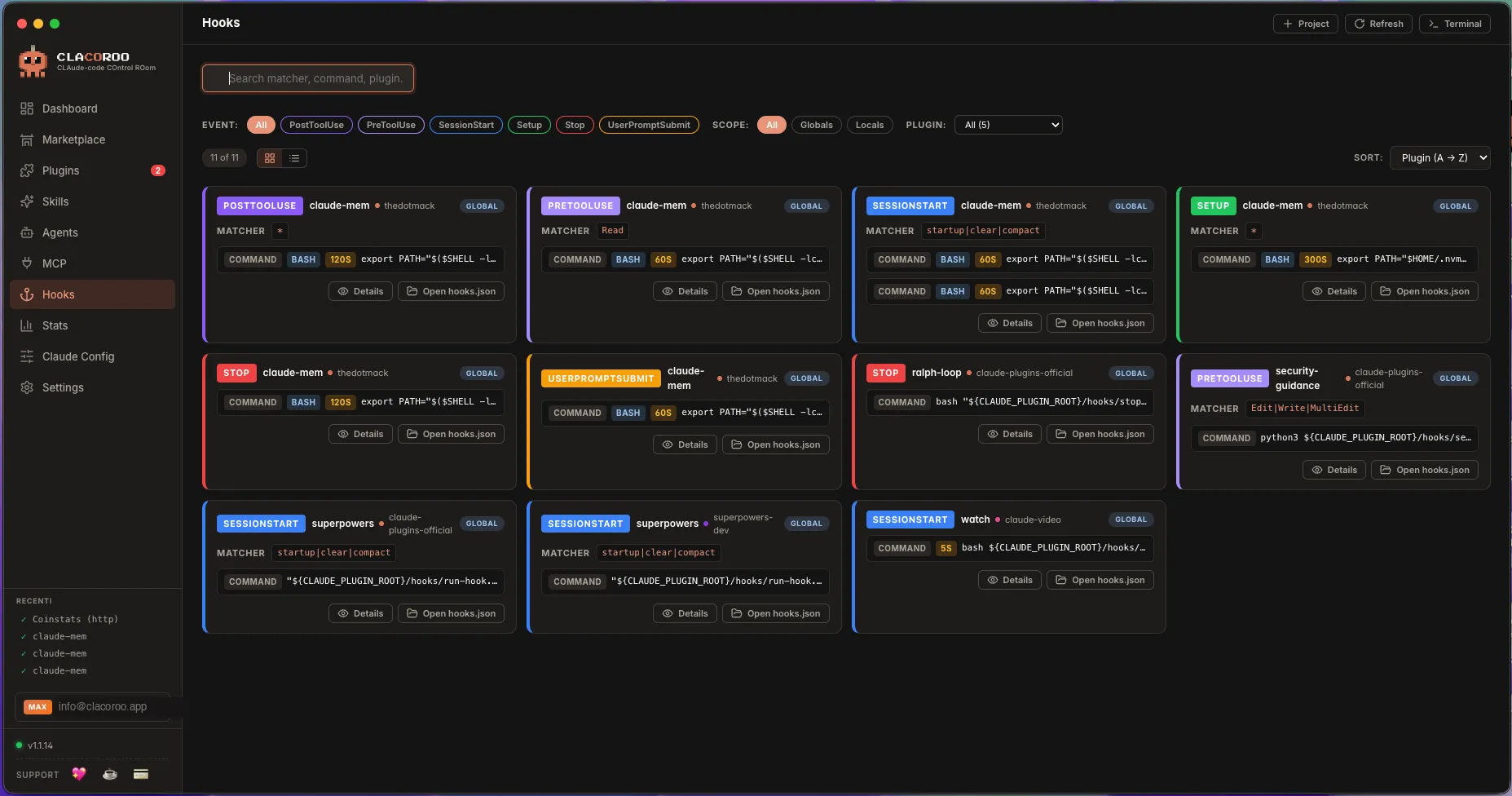
Hooks are grouped under their event — Claude Code fires hooks at specific lifecycle moments. Each card shows what runs, who provides it, and whether it can actually run on this machine.
A topbar above the groups lets you filter by event, by plugin, by scope, and search by command. The view switcher works exactly like in the other sections.
What it shows
Event groups
Claude Code defines a finite set of hook events. The most common:
| Event | Fires when |
|---|---|
| PreToolUse | Just before a tool (Bash, Edit, Read, …) runs |
| PostToolUse | Just after a tool finishes |
| UserPromptSubmit | When you send a new message |
| SessionStart | At the start of a new Claude Code session |
| PreCompact | Before Claude Code compacts the context |
| Stop | When the assistant stops a turn |
Each group shows the count of hooks attached to it; collapse and expand groups to focus on what you care about.
Hook card
Inside a group, each hook card carries:
- Matcher — what tool or pattern the hook runs against (e.g.
*for everything,Bashfor shell commands only,Edit|Writefor both) - Command — the script that runs, exactly as Claude Code will execute it
- Plugin badge — which plugin contributes this hook
- Scope — global, project, local
- Dependencies — the CLI tools the command relies on (
git,jq,curl, …) with an availability check - Optional fields — type (
command/shell/async), timeout, run condition
Dependency check
For every CLI tool the hook command references (detected from the command text), CLACOROO checks whether it’s installed and reachable on your machine. Missing tools are shown as a yellow badge with an Install suggestion (e.g. “install jq · brew install jq”).
If a hook depends on a tool you don’t have, the hook will silently fail when fired — the Dashboard’s Hooks with missing deps KPI counts these for you.
Filters
- Event — keep only PreToolUse, only PostToolUse, etc.
- Plugin — only hooks from a specific plugin
- Scope — global, project, local
- Search — matches the command text
Common tasks
How to find out what runs when I send a message
- Filter by event: UserPromptSubmit
- Every card in the resulting list will fire when you submit a prompt
- Read the Command column to know exactly what each one runs
How to disable a single hook
You don’t disable a hook in CLACOROO directly — instead, disable the plugin that owns it (use the badge on the card to identify it, then jump to Plugin manager). If the hook is in your project’s local hooks.json, edit that file directly.
How to fix a “missing dependency” warning
- Look at the dependency badge on the card (e.g. missing: jq)
- Click the install hint to get the platform-specific install command
- Install the tool on your machine
- Click Refresh in the topbar — CLACOROO re-runs the check
How to read a hook’s full command
If the command is too long for the card, click it: a modal expands the full command in a code block you can copy.
How to see which plugin contributes the most hooks
- Switch to Compact view for density
- Sort by Plugin A→Z
- Plugins now visually group their hooks together — count by eye, or open the Plugin manager and read each plugin’s hook counter
Tips & shortcuts
- The dependency check is your most useful audit: at a glance, you know whether a hook will actually do something or silently no-op
- The Dashboard KPI Hooks · N plugins tells you the spread: 20 hooks across 2 plugins is concentrated; 20 hooks across 12 plugins is sprinkled
- Hook cards with
asyncrun in parallel with Claude Code’s main flow — they won’t block your prompt - Hooks with a long
commandfield tend to be inline shell scripts — open them in the modal preview to read them comfortably Cmd / Ctrl + Kthen “hooks” jumps you here
Edge cases & errors
- No hooks appear. None of your plugins ships hooks, or all of them are in disabled plugins. Open Plugin manager to verify.
- A hook keeps showing “missing dep” after installing the tool. Claude Code looks up tools via
PATH. Restart your shell (and CLACOROO) so the newPATHis visible. - A hook’s command looks malformed. The plugin’s
hooks.jsonhas a syntax issue. Open the plugin in VS Code and checkhooks.json. - Disabling a plugin doesn’t remove its hooks from the list. Refresh the section — if the hooks remain, the plugin owns them via a fallback
hooks.jsonoutside its disabled state. Inspect the file paths in the Open hooks.json action. - A hook fires multiple times. Two plugins might share the same matcher on the same event. Filter by event to see the duplicates side by side.
Related
- Plugin manager — to enable/disable plugins (and so their hooks)
- MCP servers — the other extension point Claude Code exposes
- Dashboard — the Hooks and Hooks with missing deps KPIs come from this section
- Concepts — skill vs agent vs hook vs MCP, summarised